
Business caller tune creator that uses an AI script-writing assistant to overcome skill barriers and improve return engagement by 34%
An AI-assisted caller tune experience that let users with no writing skills publish business communication they're proud of.
SUPERFONE
Lead Designer
2025
02 weeks
concept → launch
mobile
android
live in prod
Context
Many owners feel unsure about writing a professional caller tune message
Small businesses in India depend on phone calls for sales and support. The caller tune, or greeting heard by customers, is vital for making a positive impression and fostering trust. While these business owners know their products well, they often struggle with written communication, particularly in their local languages, as most tools cater to English speakers.
This case study looks at how we solved that gap. It explores the creation of an AI-assisted text input module that allows users to generate personalised caller tunes without needing prompt-writing skills. The tool helps transform informal ideas into polished greetings, so they feel confident in what their business sounds like.
CURRENT STATE
A generic caller tune is automatically setup by default when a new user is registered
“
Thank you for calling [business name]. Please hold.
The users are nudged during onboarding to check the caller tune and customise if needed.


Pinch zoom to view
the problem
Most users never customised their caller tune after signing up.
The main challenge isn't awareness of the benefits of good caller tunes, but the lack of skills in crafting effective messages
54%
never changed after onboarding
3x
retention for users who customised
Research synthesis across user interviews, product data, and support tickets surfaced three recurring themes: Lack of writing skills, feature exists in blindspot, decision fatigue. Users often didn't know what to write, leading to inaction. They missed the opportunity to use caller tunes to build trust, convey professionalism, and share important information.

Pinch zoom to view
strategic goal
Introduce AI in a way that bridges the engagement gap by assisting users in overcoming writing skill barriers
The objective is not merely to incorporate AI; rather, it is to create a feature that users will want to shape, revisit, and update over time.
For users: reduce writing anxiety, build ownership
For Superfone: increase feature engagement, prove AI adoption path for the product

Pinch zoom to view
Principles for introducing AI
Throughout the project, these three principles guided my design decisions:
01
Meet AI on familiar ground
Build on the interactions they already know. No new patterns to learn. No new skills required.
02
Lower the skill floor
AI should absorb the writing skill gap, so users can focus on what they want to say, not how to say it well.
03
Set clear boundaries
Over-customisation leads to decision fatigue, scope creep, and users feeling lost in endless variations. The feature needs to feel powerful while remaining straightforward.
solution
Stage 1 : Remove the blank page problem
Insight
Users don't engage when they have to start from nothing. So the design starts from something, an AI-generated draft that already sounds like their business.
Opportunity
How might we get users past the empty inputs without asking them to do the work of filling them?
Design Hypothesis
If we auto-fill business info from the user's existing profiles, and generate multiple caller tune options for them to choose from, users can move through the setup flow without ever facing a blank page.
Decision 1
Fetch business info from the user's Google Business Profile
The AI needs business context such as name, category, tone, hours, location, service offerings, etc. to generate a caller tune that sounds specific to the business. Auto-fetch from Google Business Profile via OAuth. One tap to authenticate, zero typing. Delivers richer context than a form could.

Pinch zoom to view
Decision 2
Generate three variations, not one
When users get a single AI-generated output, imperfections are seen as failure, leading to frustration and abandonment. However, with multiple outputs, those same imperfections are viewed as variety, allowing users to choose the best fit and feel in control.

Pinch zoom to view
solution
Stage 2 - Enable confident editing
Insight
A starting point isn’t a final product. Users must customise the caller tune, but this requires writing skills we aimed to eliminate. If editing needs skills users lack, we would have addressed the blank page issue but recreate the original problem.
Opportunity
How might we let users shape the AI's output without requiring them to write well?
Design Hypothesis
By integrating AI into the editing process, users can easily customise their caller tune in any language without needing a prompt box, regardless of the initial quality of their writing.
Decision 3
Rejected: a chat interface
Most AI features used a conversational UI where users input prompts and receive responses, following the model set by ChatGPT. Initially, I designed a familiar wireframe with a prompt box where users could request a caller tune, iterate, and refine their inputs.
However, they seemed unsuitable for our users.
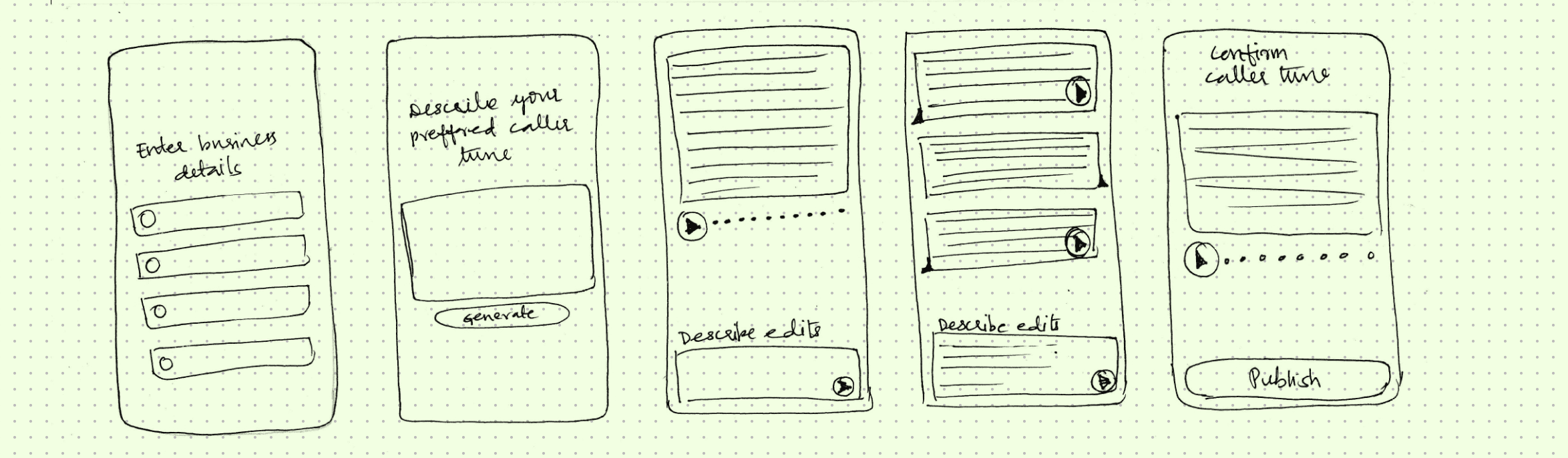
This interface failed 3 tests that mattered
❌ It required prompting skills
Most of our users had only used AI for entertainment. They didn't have a model for instructing AI to produce a business outcome. We'd swapped one writing problem for another.
❌ Unfamiliar
The non-AI version of the feature was a textbox and a button. A chat interface would have asked users to learn an entirely new interaction model.
❌ Sets a wrong precedent
This was the first AI feature in Superfone. The interaction pattern established here would influence user expectations for all future AI features.
Pinch zoom to view
The reframe
How do we make AI useful without asking users to instruct it?
The solution was to retain the familiar textbox for users while incorporating AI functionality within it. Users would have the ability to edit the AI's output directly, in any language and in any format. The AI would then refine whatever they wrote.
Decision 4
"Improve it" — one button for polish
Users often can’t identify problems in their writing, which is why they use our tool. Instead of making them diagnose issues, our AI analyses and corrects the text with a single tap, providing an improved version without the need for users to know what changed.

Behind the button
The AI is constrained to a fixed set of quality parameters: character limit, tone, language handling, business polish. A single "Improve it" button was about removing choices. Users don't need to know what's wrong, they need the writing to be good.
Pinch zoom to view
Decision 5
"Fit content" — a contextual button for length
Caller tunes have a strict character limit to ensure messages are concise and prevent caller frustration. When users exceed this limit, we need to shorten their messages without losing meaning. However, many struggle to condense their writing effectively.
To solve this, I proposed a contextual button for two reasons:
It appears only when needed, preventing unnecessary UI clutter for users within the limit.
It targets the specific issue of length. Unlike the "Improve it" feature, "Fit content" focuses solely on this task, making its purpose clear to users.

Pinch zoom to view
Decision 6
"More ideas" — for variety
Some users want different versions of their messages, but unlimited regeneration can lead to fatigue and higher costs. The "More ideas" button offers a fixed set of alternatives, providing variety without the downsides of infinite options. This approach prevents users from getting stuck comparing outputs and delays publication.

Pinch zoom to view
Behind the screen
AI's behaviour was shaped by defined parameters and deliberate constraints.
01
Smart prompting logic
The prompt was constrained on four dimensions:
Tone : professional, inviting and helpful
Length : within the voice generation budget
Brand fit : pulled context from website and Instagram, avoided generic outputs
Language : handled 8+ languages and mixed-language input
02
AI was restricted from accepting
Tone instructions from users. Tone lived in voice selection, not text input so the prompt stayed stable.
User customisation of the prompt itself. Users edit outputs, not instructions.
03
Designed-in constraints
No undo, no drafts, no version history. Don't like AI's changes? Exit without saving. No state to manage.
Bounded variations. More ideas generates a fixed set. If none fit, the path forward is editing the original text instead of endlessly regenerating.
impact
Users didn't just create their caller tune, they came back to shape it.
The aim was to encourage users to create and continuously improve their caller tunes, transforming the feature from a one-time setup into an ongoing business element.
31%
of users created their caller tune with AI
and came back to update it at least once within a month
Supporting metrics
Before
After
AI-assisted creation rate
8% of users customised
42% of new users customised
The blank page problem was real. Removing it changed behaviour.
Return-to-update rate
6% returned to update
31% returned within a month
Editing didn't feel like work. Users returned voluntarily.
"Improve it" usage rate

No data before
58% of users tapped Improve it at least once
Users trusted AI to fix what they wrote.
Festival & seasonal update rate
Not observed
19% of users updated around a major festival
The caller tune became a living asset — a behaviour the pre-AI feature never produced.
User sentiment
<5% had any opinion on their default
28% said it sounded more professional
The most common qualitative theme: "It feels like part of my brand."
surface adoption
The AI-assisted text module was built for caller tune, but the user need turned out to be common across the product.
“
I know what I want to say; help me say it well.
Its evolution extends beyond this feature to enhance the entire product.
Key changes include prompts, tone, character limits, audience, and language defaults. However, constants include the text box, the need for improvement, idea generation, and the overall user experience.
The value compounds as each new surface adopts the AI module with less design effort required. Users enjoy a consistent AI interaction, fostering a coherent personality across the product without the need for each team to redefine the interaction.


reflection
AI doesn't have to feel like a coworker.
Many AI business tools frame AI as a coworker, appealing mainly to users already familiar with its role. However, our users have primarily engaged with AI for entertainment and haven't considered its business applications.
To address this, I redefined this AI interaction as added intelligence. A tool that enhances task completion speed and effectiveness without requiring conversation. Since our users prefer sticking to familiar methods and avoid disruptive changes, it became crucial to showcase the AI's value.
This AI interaction is designed to perform specific tasks seamlessly within familiar interfaces, minimizing user decisions and cognitive load. This allows users to focus on their work without feeling overwhelmed by interactions with AI.
credits
Role & Team
Sole product designer.
Owned end-to-end design from problem framing through final QA.
Worked closely with the PM on product strategy and direction
Owned all UX-side technical decisions
Ran design critiques with cross-functional stakeholders
Took an active role in QA, including adversarial testing of AI outputs
partnered with engineering through implementation
and, ofcourse, the design implementation :)
This project was executed in a focused two-week sprint, aiming to assess AI adoption among Superfone users and guide us in developing more advanced AI features.
Team 1 PM · 1 QA · 1 frontend engineer · 1 backend engineer

Let's talk!
Have thoughts on this case study, or working on something similar? I'd love to hear from you.
shailaja.riva@gmail.com

Business caller tune creator that uses an
AI script-writing assistant to overcome skill barriers and improve return engagement by 34%
My role
Led end-to-end design from problem framing through QA
Reframed the problem from AI generation to editing-first assistance
Owned all UX-side technical decisions
Partnered with engineering on prompt design and multilingual handling
Adversarial testing of AI outputs across business types and languages
SUPERFONE
Lead Designer
2025
02 weeks
concept → launch
mobile
android
live in prod
Context
Many owners feel unsure about writing a professional caller tune message
Small businesses in India depend on phone calls for sales and support. The caller tune, or greeting heard by customers, is vital for making a positive impression and fostering trust. While these business owners know their products well, they often struggle with written communication, particularly in their local languages, as most tools cater to English speakers.
This case study looks at how we solved that gap. It explores the creation of an AI-assisted text input module that allows users to generate personalised caller tunes without needing prompt-writing skills. The tool helps transform informal ideas into polished greetings, so they feel confident in what their business sounds like.
CURRENT STATE
A generic caller tune is automatically setup by default when a new user is registered
“
Thank you for calling [business name]. Please hold.
The users are nudged during onboarding to check the caller tune and customise if needed.
the problem
Most users never customised their caller tune after signing up.
The main challenge isn't awareness of the benefits of good caller tunes, but the lack of skills in crafting effective messages
54%
never changed after onboarding
3x
retention for users who customised
Research synthesis across user interviews, product data, and support tickets surfaced three recurring themes: Lack of writing skills, feature exists in blindspot, decision fatigue. Users often didn't know what to write, leading to inaction. They missed the opportunity to use caller tunes to build trust, convey professionalism, and share important information.
strategic goal
Introduce AI in a way that bridges the engagement gap by assisting users in overcoming writing skill barriers
The objective is not merely to incorporate AI; rather, it is to create a feature that users will want to shape, revisit, and update over time.
For users: reduce writing anxiety, build ownership
For Superfone: increase feature engagement, prove AI adoption path for the product
Principles for introducing AI
Throughout the project, these three principles guided my design decisions:
01
Meet AI on familiar ground
Build on the interactions they already know. No new patterns to learn. No new skills required.
02
Lower the skill floor
AI should absorb the writing skill gap, so users can focus on what they want to say, not how to say it well.
03
Set clear boundaries
Over-customisation leads to decision fatigue, scope creep, and users feeling lost in endless variations. The feature needs to feel powerful while remaining straightforward.
solution
Stage 1 : Remove the blank page problem
Insight
Users don't engage when they have to start from nothing. So the design starts from something, an AI-generated draft that already sounds like their business.
Opportunity
How might we get users past the empty inputs without asking them to do the work of filling them?
Design Hypothesis
If we auto-fill business info from the user's existing profiles, and generate multiple caller tune options for them to choose from, users can move through the setup flow without ever facing a blank page.
Decision 1
Fetch business info from the user's Google Business Profile
The AI needs business context such as name, category, tone, hours, location, service offerings, etc. to generate a caller tune that sounds specific to the business. Auto-fetch from Google Business Profile via OAuth. One tap to authenticate, zero typing. Delivers richer context than a form could.
Decision 2
Generate three variations, not one
When users get a single AI-generated output, imperfections are seen as failure, leading to frustration and abandonment. However, with multiple outputs, those same imperfections are viewed as variety, allowing users to choose the best fit and feel in control.
solution
Stage 2 - Enable confident editing
Insight
A starting point isn’t a final product. Users must customise the caller tune, but this requires writing skills we aimed to eliminate. If editing needs skills users lack, we would have addressed the blank page issue but recreate the original problem.
Opportunity
How might we let users shape the AI's output without requiring them to write well?
Design Hypothesis
By integrating AI into the editing process, users can easily customise their caller tune in any language without needing a prompt box, regardless of the initial quality of their writing.
Decision 3
Rejected: a chat interface
Most AI features used a conversational UI where users input prompts and receive responses, following the model set by ChatGPT. Initially, I designed a familiar wireframe with a prompt box where users could request a caller tune, iterate, and refine their inputs.
However, they seemed unsuitable for our users.
This interface failed 3 tests that mattered
❌ It required prompting skills
Most of our users had only used AI for entertainment. They didn't have a model for instructing AI to produce a business outcome. We'd swapped one writing problem for another.
❌ Unfamiliar
The non-AI version of the feature was a textbox and a button. A chat interface would have asked users to learn an entirely new interaction model.
❌ Sets a wrong precedent
This was the first AI feature in Superfone. The interaction pattern established here would influence user expectations for all future AI features.
The reframe
How do we make AI useful without asking users to instruct it?
The solution was to retain the familiar textbox for users while incorporating AI functionality within it. Users would have the ability to edit the AI's output directly, in any language and in any format. The AI would then refine whatever they wrote.
Decision 4
"Improve it" — one button for polish
Users often can’t identify problems in their writing, which is why they use our tool. Instead of making them diagnose issues, our AI analyses and corrects the text with a single tap, providing an improved version without the need for users to know what changed.
Behind the button
The AI is constrained to a fixed set of quality parameters: character limit, tone, language handling, business polish. A single "Improve it" button was about removing choices. Users don't need to know what's wrong, they need the writing to be good.
Decision 5
"Fit content" — a contextual button for length
Caller tunes have a strict character limit to ensure messages are concise and prevent caller frustration. When users exceed this limit, we need to shorten their messages without losing meaning. However, many struggle to condense their writing effectively.
To solve this, I proposed a contextual button for two reasons:
It appears only when needed, preventing unnecessary UI clutter for users within the limit.
It targets the specific issue of length. Unlike the "Improve it" feature, "Fit content" focuses solely on this task, making its purpose clear to users.
Decision 6
"More ideas" — for variety
Some users want different versions of their messages, but unlimited regeneration can lead to fatigue and higher costs. The "More ideas" button offers a fixed set of alternatives, providing variety without the downsides of infinite options. This approach prevents users from getting stuck comparing outputs and delays publication.
Behind the screen
AI's behaviour was shaped by defined parameters and deliberate constraints.
01
Smart prompting logic
The prompt was constrained on four dimensions:
Tone : professional, inviting and helpful
Length : within the voice generation budget
Brand fit : pulled context from website and Instagram, avoided generic outputs
Language : handled 8+ languages and mixed-language input
02
AI was restricted from accepting
Tone instructions from users. Tone lived in voice selection, not text input so the prompt stayed stable.
User customisation of the prompt itself. Users edit outputs, not instructions.
03
Designed-in constraints
No undo, no drafts, no version history. Don't like AI's changes? Exit without saving. No state to manage.
Bounded variations. More ideas generates a fixed set. If none fit, the path forward is editing the original text instead of endlessly regenerating.
impact
Users didn't just create their caller tune, they came back to shape it.
The aim was to encourage users to create and continuously improve their caller tunes, transforming the feature from a one-time setup into an ongoing business element.
31%
of users created their caller tune with AI
and came back to update it at least once within a month
Supporting metrics
Before
After
AI-assisted creation rate
8% of users customised
42% of new users customised
The blank page problem was real. Removing it changed behaviour.
Return-to-update rate
6% returned to update
31% returned within a month
Editing didn't feel like work. Users returned voluntarily.
"Improve it" usage rate
No data before
58% of users tapped Improve it at least once
Users trusted AI to fix what they wrote.
Festival & seasonal update rate
Not observed
19% of users updated around a major festival
The caller tune became a living asset — a behaviour the pre-AI feature never produced.
User sentiment
<5% had any opinion on their default caller tune
28% said their new caller tune made their business sound more professional
The most common qualitative theme: "It feels like part of my brand."
surface adoption
The AI-assisted text module was built for caller tune, but the user need turned out to be common across the product.
“
I know what I want to say; help me say it well.
Its evolution extends beyond this feature to enhance the entire product.
Key changes include prompts, tone, character limits, audience, and language defaults. However, constants include the text box, the need for improvement, idea generation, and the overall user experience.
The value compounds as each new surface adopts the AI module with less design effort required. Users enjoy a consistent AI interaction, fostering a coherent personality across the product without the need for each team to redefine the interaction.
reflection
AI doesn't have to feel like a coworker.
Many AI business tools frame AI as a coworker, appealing mainly to users already familiar with its role. However, our users have primarily engaged with AI for entertainment and haven't considered its business applications.
To address this, I redefined this AI interaction as added intelligence. A tool that enhances task completion speed and effectiveness without requiring conversation. Since our users prefer sticking to familiar methods and avoid disruptive changes, it became crucial to showcase the AI's value.
This AI interaction is designed to perform specific tasks seamlessly within familiar interfaces, minimizing user decisions and cognitive load. This allows users to focus on their work without feeling overwhelmed by interactions with AI.
credits
Role & Team
Sole product designer.
Owned end-to-end design from problem framing through final QA.
Worked closely with the PM on product strategy and direction
Owned all UX-side technical decisions
Ran design critiques with cross-functional stakeholders
Took an active role in QA, including adversarial testing of AI outputs
partnered with engineering through implementation
and, ofcourse, the design implementation :)
This project was executed in a focused two-week sprint, aiming to assess AI adoption among Superfone users and guide us in developing more advanced AI features.
Team 1 PM · 1 QA · 1 frontend engineer · 1 backend engineer
Let's talk!
Have thoughts on this case study, or working on something similar? I'd love to hear from you.
shailaja.riva@gmail.com